Introduction:
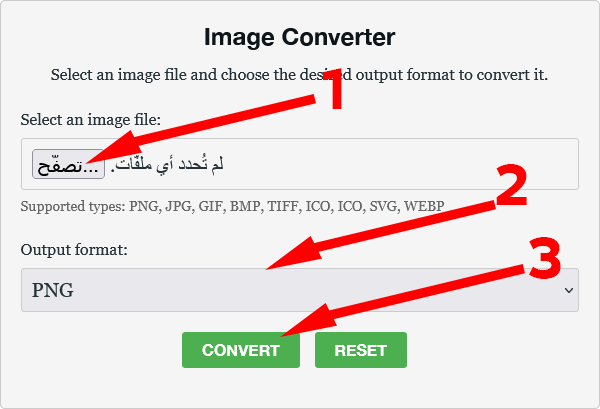
In the fast-paced world of digital content and high-resolution printing, choosing the right image file format is crucial—it affects everything from website loading speed to professional print quality. The need for a versatile, single solution that handles every major standard is met by advanced online tools like ImageConverte. This platform excels by offering seamless, high-fidelity conversion across eight essential formats: PNG, JPG, GIF, BMP, TIFF, ICO, SVG, and WEBP. Understanding the unique purpose of each format is key to leveraging this tool effectively for web optimization, professional archives, and graphic design.
ImageConverte: Your Gateway to Universal Image Compatibility
ImageConverte is designed as an all-in-one solution to simplify the complex landscape of image file types. It eliminates the need for multiple pieces of software by bringing all necessary conversion options into one, fast, browser-based interface.
The core strength of the platform lies in its ability to support and accurately convert between these eight foundational file types, each serving a distinct purpose:
1. JPG (Joint Photographic Experts Group): The Web Photography King
- Primary Use: Best for complex photographic images and artwork with millions of colours.
- Benefits: Uses lossy compression, achieving the smallest file sizes for high-detail photos. This is vital for fast loading speeds on blogs, e-commerce sites, and social media.
- SEO Value: Its small file size directly contributes to faster website performance, which is a major factor in Google’s ranking algorithms (Core Web Vitals).
2. PNG (Portable Network Graphics): The Transparency Champion
- Primary Use: Ideal for logos, icons, line art, and graphics where background transparency is required.
- Benefits: Uses lossless compression, meaning image quality is never sacrificed. Crucially, it supports an alpha channel for varying levels of transparency, unlike GIF’s simple on/off transparency.
- SEO Value: Ensures sharp, high-quality graphics and professional-looking elements without impacting speed as severely as uncompressed formats, especially for simpler graphics.
3. WEBP (Web Picture Format): The Modern Speed Booster
- Primary Use: The optimal format for all modern web images (photos and graphics) across websites.
- Benefits: Developed by Google, WebP offers significantly better compression than JPG (25-34% smaller files) and supports both lossy and lossless types, along with transparency and even basic animation.
- SEO Value: Highly recommended by Google. Using WebP is one of the most effective ways to boost page load speed and improve user experience, directly translating to better search rankings.
4. SVG (Scalable Vector Graphics): The Resolution-Independent Icon
- Primary Use: Logos, icons, charts, and detailed illustrations that need to look perfect at any size.
- Benefits: As a vector format (XML-based code, not pixels), it scales infinitely without quality degradation. This makes it incredibly lightweight and perfect for responsive web design.
- SEO Value: SVG files are tiny, text-based, and searchable, leading to better accessibility, faster loading, and perfect display across all devices and resolutions.
5. GIF (Graphics Interchange Format): The Animation Essential
- Primary Use: Simple animations, short video clips for web use, and simple graphics with limited colour palettes.
- Benefits: The only universally supported format for multi-frame web animation. It uses lossless compression but is limited to 256 colours, making it poor for photographs.
- SEO Value: Used selectively for visual engagement (micro-animations), but size must be kept very small to prevent slowing down the page.
6. TIFF (Tagged Image File Format): The Archival Standard
- Primary Use: Professional printing, high-resolution document scanning, and archival-grade image storage.
- Benefits: Supports various compressions, including lossless, and allows for multi-page documents and deep colour information (16-bit). It is the gold standard for quality where file size is irrelevant.
- Application Value: Crucial for designers sending master files to commercial printers; it’s rarely used directly on the web.
7. BMP (Bitmap): The Original Quality Standard
- Primary Use: Storing uncompressed, high-fidelity raster images, primarily for legacy Windows applications or specific software development.
- Benefits: The most straightforward, direct representation of pixel data. It is generally uncompressed, guaranteeing zero loss of data or quality from the moment of creation.
- Application Value: Due to its massive file size, its use is almost entirely restricted to internal software or archival purposes where uncompressed raw data is mandatory.
8. ICO (Icon File Format): The Browser Tab Identity
- Primary Use: Creating favicons (the tiny images in browser tabs) and Windows application icons.
- Benefits: The ICO format is uniquely designed to store multiple image resolutions (e.g., 16×16, 32×32, 48×48) within a single file, ensuring the icon displays sharply across different device needs.
- SEO Value: Essential for professional branding. A working favicon is a minor but important factor in user experience and trust, especially in browser bookmark lists.
The ImageConverte Advantage for SEO and Workflow
By providing access to all these formats under one simple URL, ImageConverte empowers users to make optimal choices for every project:
- Speed Optimization: Users can quickly convert large JPGs or PNGs to the superior WEBP format, directly addressing Google’s demand for fast loading times.
- Branding Consistency: Seamlessly create high-quality PNG assets and convert them into the specialized ICO format for consistent visual identity across the web.
- Archival Control: Easily convert photos to the robust, uncompressed TIFF or BMP formats for long-term, high-quality storage before deployment.
- Scalability: Transform logos or illustrations into SVG for perfect scaling on all devices, eliminating resolution issues forever.
In conclusion, ImageConverte acts as the universal adapter for the digital image world. By understanding the distinct role of PNG, JPG, WEBP, and the other formats, creators can leverage this tool to optimize every image for its intended purpose—whether it’s for peak website performance or professional print quality.
Leave a Reply